VST3 · Windows · Free
Chordical
A synthesizer you wire like a studio.
Eight oscillators, each with its own effect chain, drawn as a graph on an infinite canvas. Free, and it runs in any VST3 host on Windows.
An instrument, not a preset browser.
Chordical is a VST3 synthesizer and effects processor written from scratch in C++ on JUCE 8. It runs in any VST3 host on Windows, and it is free.
Each of the eight oscillators is a real sound source — sine, triangle, square, saw, noise, or a waveform you draw yourself with up to 32 points and curved segments between them. Blend the four basic shapes together with one slider each, stack up to eight detuned unison copies, and run the result through the warp engine to bend amplitude, frequency and phase.
Saw and square are PolyBLEP anti-aliased and triangle uses PolyBLAMP, so the top octave stays clean instead of turning to grit. Notes are shaped by a DAHDSR envelope — delay and hold ahead of the usual attack, decay, sustain and release — and every voice keeps its own stereo image from the oscillator all the way to the master bus.
- 51node typesSources, EQ, dynamics, reverb, delay, chorus, vocal, utility
- 8oscillatorsEach carrying its own chain of up to 64 node slots
- 64voicesPolyphonic, with per-voice stereo all the way through
- 12modulatorsSix DAHDSR envelopes and six LFOs, per voice
Four shapes, one slider each — the same mix the plugin gives every oscillator, and the same mix the waveform behind this page is drawing. Playing makes sound.
Hear the shape mix before you download anything.
This is the oscillator panel’s blend, running in your browser: each slider adds one shape’s harmonic series to the same wave, and the chord buttons play the voicing through four detuned voices. The plugin does the same thing at 64 voices, with a drawn custom shape as a fifth option and a warp engine after it.
The patch is a graph.
Right-click anywhere. Drop a node. Draw a wire. There is no fixed signal path to work around.
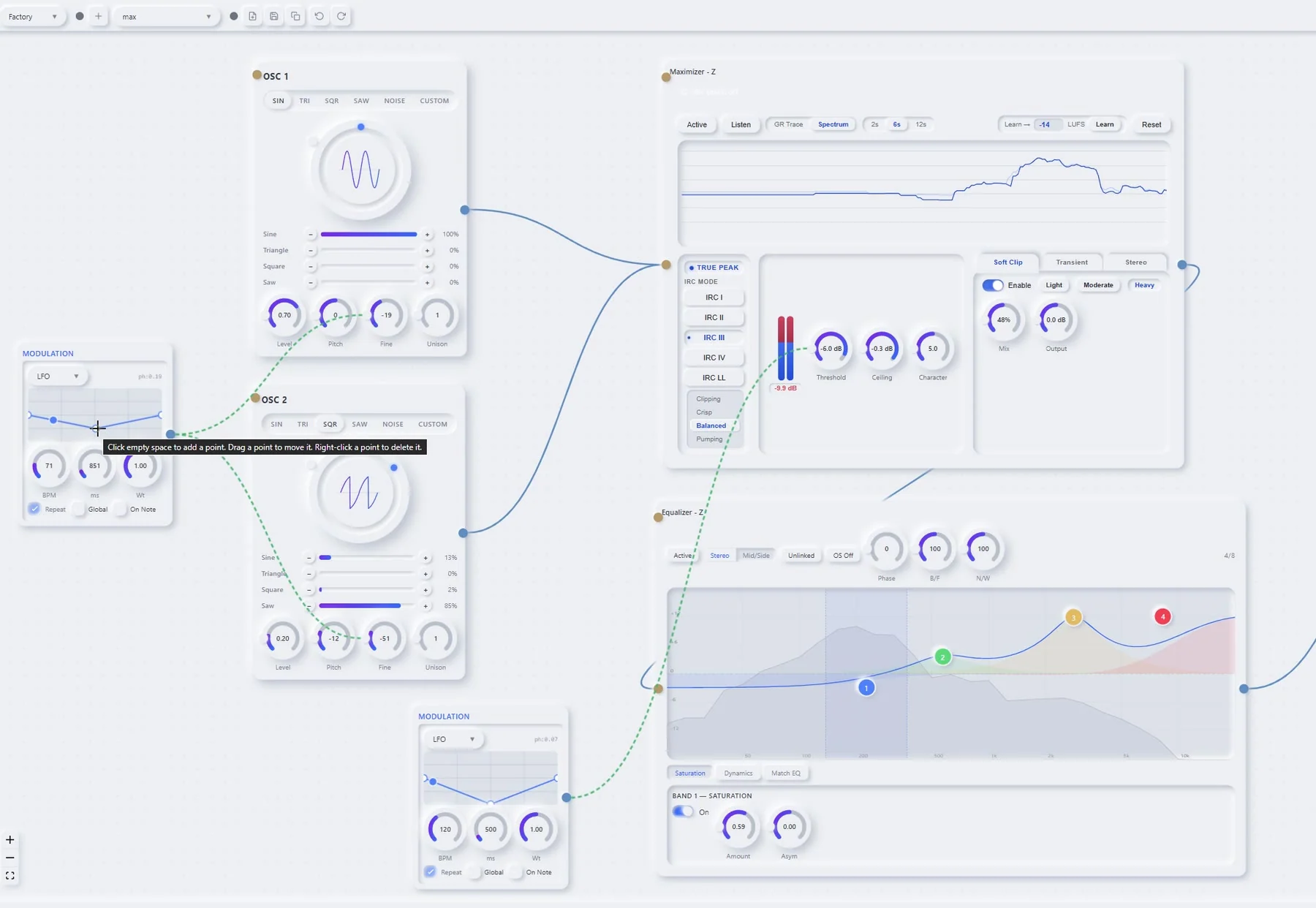
Chordical does not give you three effect slots and a routing menu. It gives you an infinite canvas and a compiler. Drag nodes wherever they make sense, connect any output to any input, and the plugin topologically sorts what you drew into a plan the audio thread walks once per sample. There are 51 kinds of node to choose from, and a single voice has room for 521 of them at once — eight oscillators, sixty-four slots each, and the master out.
Fan-out and fan-in are free: send one oscillator into a filter and a distortion at the same time and the master sums them, or split a signal into low, mid and high bands and treat each one separately. Zoom out and the whole instrument is visible at once — including the chain your own voice is running through.
- Right-click to open the palette anywhere on the canvas
- Any output to any input — cycles are detected and broken
- Parallel branches sum automatically at the join
- Room for 521 nodes in a single voice graph
- Zoom and pan an infinite workspace; nodes keep their place
Every knob is a destination.
Draw the shape you want. Connect it to a knob. Connect the same shape to five more.
Modulation in Chordical is not a matrix you fill in — it is a wire you draw. Add a modulation node, sketch a curve with up to sixteen points and curved segments between them, then drag from the node to any knob on any node in the patch. The knob shows its effective value moving in real time while the note plays.
Each curve can run as an envelope or a looping LFO, retrigger on note-on or free-run, and be either per-voice or phase-locked across every voice at once. The classic mod matrix is still there underneath for envelopes, LFOs, velocity and MPE pressure, with linear, exponential, S-curve and quantised response.
- Hand-drawn curves, up to 16 points, straight or curved segments
- One curve can drive any number of knobs
- Envelope or LFO, retriggered or free-running
- Per-voice, or phase-shared across all voices
- Velocity, MPE pressure and note position as sources
It knows the theory so you do not have to.
Pick a key. Pick a scale. Press one key and a chord comes out — in tune, in voicing, in time.
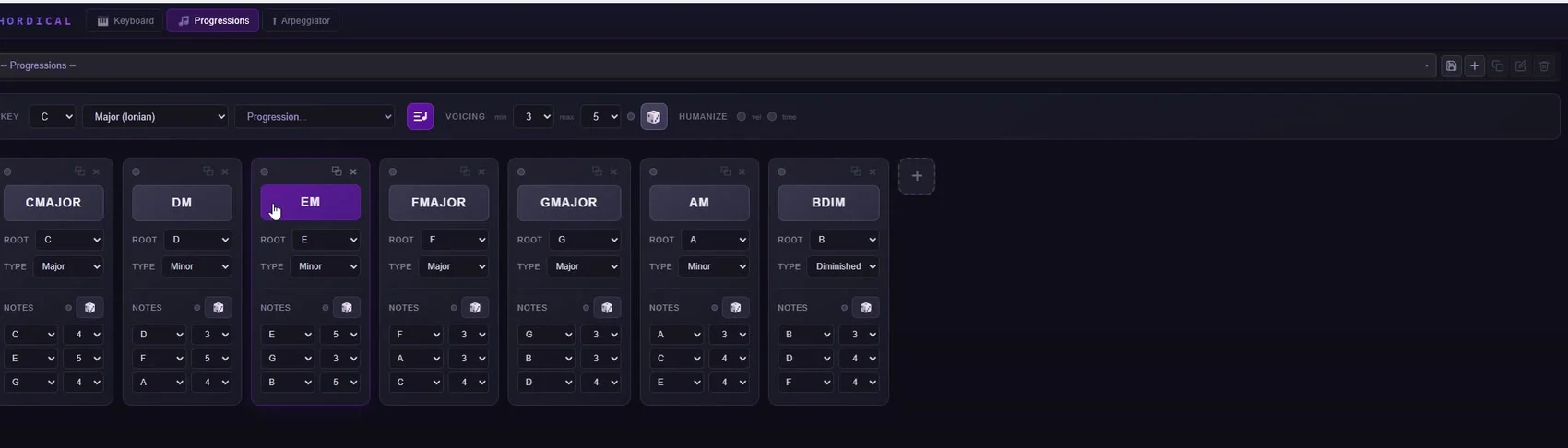
The MIDI node holds a chord keyboard, a progression sequencer and a pattern arpeggiator, and they all speak the same theory: 61 scales from the seven diatonic modes through harmonic minor, the melodic-minor modes and the pentatonics; 15 chord types; 25 progression templates named for what they are — I–V–vi–IV, ii–V–I, twelve-bar blues.
Set how many notes a voicing may use, randomise octaves for spread, and switch on humanise to scatter velocity and timing so it stops sounding like a grid. The arpeggiator plays what you hold, at 1/4 through 1/32, up, down, up-down or as a phrase, and every note goes out as real MIDI to any other track in your DAW.
- 61scales
- 25progressions
- 15chord types
- 12keys
The arpeggiator is a MIDI instrument, not an effect.
It runs in four modes — common tones, the notes you are pressing, the whole scale, or a phrase you draw — at 1/4 through 1/32, with note length, direction, octave range and swing, and a choice of what happens when you change chord mid-pattern: continue, restart, latch, or wait for the next beat.
Everything it plays leaves as real MIDI. Put Chordical on one track, point another instrument at its output, and it drives that instead — which is exactly how a hardware arpeggiator would be wired, minus the cable.
51 nodes. Nothing is a slot.
The effects are not a bus at the end of the instrument. Every one of them can sit anywhere in the graph, on any oscillator, modulated by anything.
The list is not padded. Each engine was written because it is one you actually reach for: a true-peak maximizer with four release characters, a mid/side parametric with dynamic bands and per-band saturation, a tape echo with real wow and flutter, a reverb long enough to lose the note in. Nothing here is a demo version of itself.
Every node is stereo end to end, every parameter is a modulation target, and any of them can be dropped on an oscillator chain or on the master bus. Chordical will also host somebody else’s VST3 in a node and treat it like one of its own.
Audio Sources
Synthesis, samples, drums, or your own microphone routed straight into the graph.
- Oscillator
- Drums
- Sample Rack
- Sample Instrument
- Audio In
Nine and a half minutes, no cuts.
The full walkthrough — oscillators, drawn waveforms, modulation, the node palette, and the three-band vocal chain the narration itself is running through.
It ends with a melody written for the demo, played through the instrument you have been watching get built.
That is the whole instrument. It costs nothing.
Download ChordicalPresets travel with the synth.
Save a patch, tag it, publish it — from inside the plugin, without opening a browser. Other people’s patches appear in the same browser you saved yours to, and load with one click. Preset files carry a format version, so an old patch keeps working after the engine moves on.
- 01 Save the patch in the plugin
- 02 Sign in once, from the plugin
- 03 Publish — it appears in everyone’s browser

Take it and make something.
Free to download, free to use, and no account needed to make a sound with it. Unzip it into your VST3 folder, rescan, and it is in your instrument list.